




Product
Why Schools Need School Management Software: Problems, Solutions and a Better Way Forward
Explore common school management challenges and how SchPage K12 and SchPage TEdu support schools and tertiary institutions.
Retenvo Team ·

A school day starts long before the first lesson. Someone is checking attendance. A parent wants to know whether a fee payment was received. A teacher is preparing a report card, while an administrator searches for a student’s admission record. At a university, a student may be trying to register for courses while a department works out its lecture timetable.
Each task might seem small on its own. Together, they shape the experience of everyone in an institution. When information is scattered across paper files, spreadsheets, chat messages and different offices, even simple questions can take too long to answer.
School management software brings these everyday activities into a more organised digital environment. It can help institutions keep better records, coordinate work and give the right people access to the information they need. Most importantly, it can give educators and administrators more room to focus on the people behind the paperwork.
At Retenvo, we are building SchPage around this idea: education works better when the systems supporting it work better too. SchPage K12 is designed for nursery, primary and secondary schools, while SchPage TEdu is designed for universities, polytechnics, colleges of education and other tertiary institutions.
What is school management software?
School management software is a digital system that helps an educational institution organise and manage its administrative and academic activities. Depending on the institution and the software, those activities can include admissions, student records, attendance, timetables, assessments, fees and communication.
Think of it as a shared workspace for the people who keep an institution running. An administrator can work on admissions, a teacher can access the information needed for a class, and a parent or student can use a portal to find relevant updates. Access should be appropriate to each person’s role.
It is not a substitute for good teachers, thoughtful school leaders or personal relationships. It is a tool that helps those people spend less time chasing information and more time doing their jobs well.
The everyday problems schools face—and how software can help
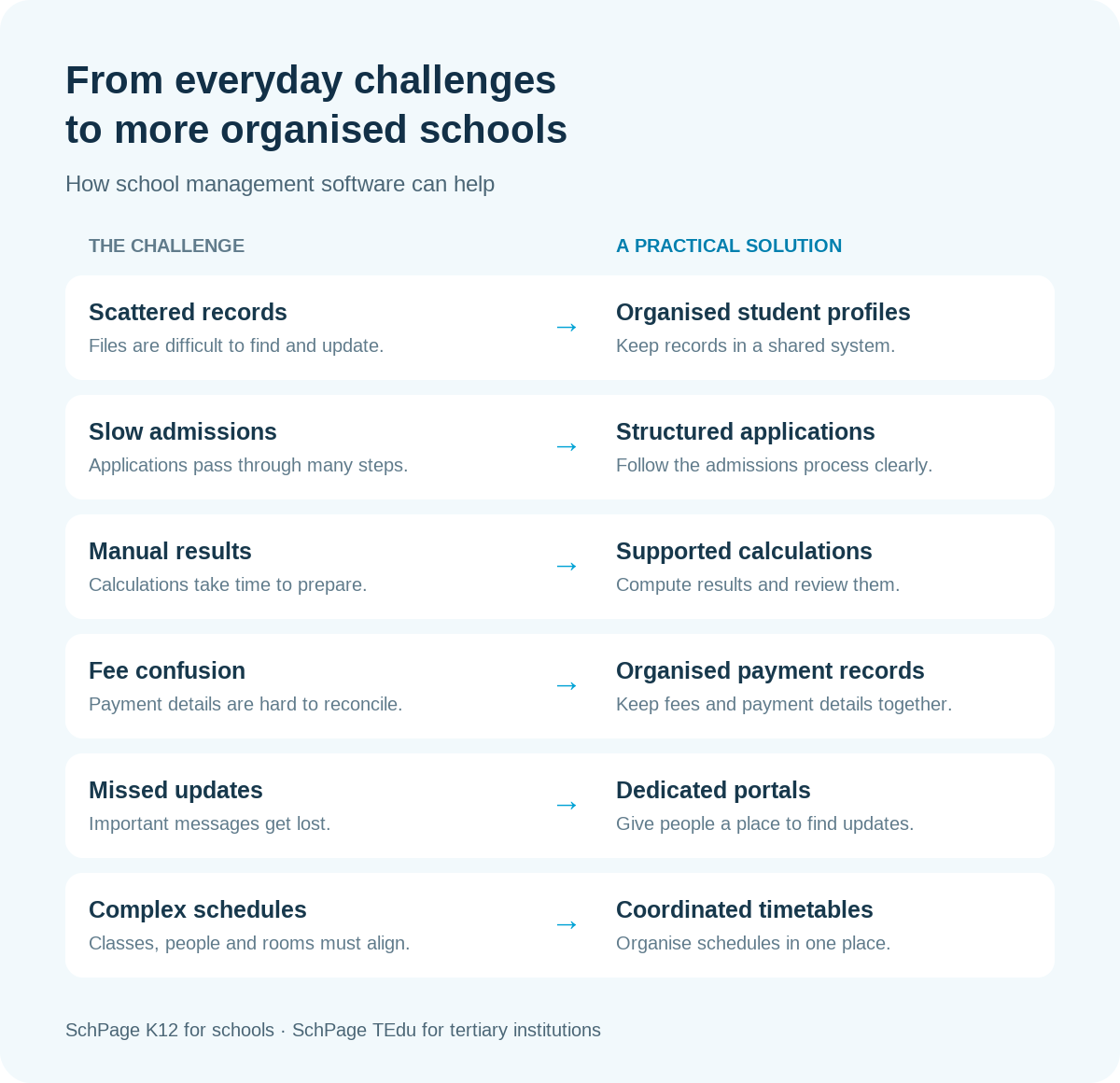
The following examples are illustrative. Every institution has its own processes, but the frustrations will feel familiar to many school leaders and staff.
1. Student records are scattered and difficult to find
Imagine a parent calls the school office to update a child’s contact information. One version is in an admission file, another is in a spreadsheet, and a teacher has a third number saved on a phone. Which one is current?
Paper files and disconnected spreadsheets can make it difficult to maintain a consistent view of a student’s journey. Documents may be misplaced, information may be entered more than once, and staff may spend valuable time searching through cabinets or asking colleagues for help.
The solution: A central student record gives authorised staff a clearer place to maintain important information, from admission details and class placement to other records used by the institution. Digital records still need careful entry, review and appropriate access controls, but they make it easier to find and update information consistently.
For tertiary institutions, the same principle applies across a different structure: a student’s record may need to reflect a faculty, department, programme and level. A system designed for that environment helps staff organise information around the way the institution actually operates.
2. Admissions involve too many disconnected steps
Admissions can be exciting for families and students, but behind the scenes it often involves forms, document checks, entrance assessments, interviews, lists and follow-up calls. When those steps are tracked separately, it becomes harder to see where an application stands or what needs attention next.
For a school, a misplaced form or delayed admission letter can create an avoidable first impression. For a tertiary institution handling a larger volume of applicants, inconsistent records can add to the pressure on admissions staff.
The solution: A structured admissions process helps staff follow applications from submission through the relevant steps. SchPage K12 supports online applications, entrance exams, interviews, waiting lists and admission letters. SchPage TEdu supports admissions and student onboarding, including document uploads and student records.
The goal is a clearer process for both the institution and the people applying—not simply replacing a paper form with an online one.
3. Preparing results and report cards takes too much time
At the end of a term, teachers may need to gather assessment scores, check calculations, prepare report cards and respond to questions about results. When the process depends on multiple spreadsheets and repeated manual calculations, an incorrect formula or missing score can cause delays and extra work.
Consider a class teacher who spends an evening checking totals instead of using that time to reflect on students who need additional support. The effort matters, but much of the repetitive work can be handled more efficiently.
The solution: SchPage K12 supports flexible assessment setups, automatic result computation and branded PDF report cards. Teachers and school administrators can use a more consistent process to prepare results while retaining responsibility for checking scores and applying the school’s assessment policies.
Automation can reduce repetitive calculation; it does not remove the need for careful review or professional judgement.
4. Attendance is recorded, but not always easy to follow up
Attendance is more than a register completed at the beginning of a lesson. A pattern of absence can be an early sign that a learner needs support, or that a family is facing a challenge the school should understand.
When registers are stored in different books or offices, finding a reliable attendance history may take time. For a school with several classes or branches, bringing records together can become even more demanding.
The solution: A digital attendance register can make records easier for authorised staff to enter and review. SchPage K12 supports daily attendance registers across class arms and branches, helping schools maintain a more organised view of attendance and follow up where needed.
The most meaningful step still happens between people: a teacher noticing a pattern and a school reaching out with care.
5. Fee tracking becomes a source of confusion
A parent says they have paid. The accounts office is checking a bank alert. An administrator is trying to prepare a list of outstanding fees. Meanwhile, a student needs confirmation before completing another step.
When invoices, payments and records are managed in separate places, staff may spend time reconciling information and responding to the same questions. Families and students can also feel uncertain about what they owe and whether a payment has been recorded.
The solution: Organising fee structures, invoices and payment records in one system can make financial administration easier to follow. SchPage K12 supports fee structures, invoices, payments and expense tracking. SchPage TEdu supports school, acceptance and hostel fees, including online payments, instalments and receipts.
Clear processes still matter: institutions should verify records, explain their payment policies and make it easy for families or students to resolve discrepancies.
6. Communication gets lost between school and home
A message written in a diary may not reach a parent. A notice sent in a busy chat group may disappear among dozens of replies. A guardian who misses an update may feel excluded, while staff may spend the next day answering the same questions repeatedly.
Good communication is not just about sending more messages. It is about making important information easier for the right people to find and understand.
The solution: SchPage K12 provides dedicated portals for administrators, staff, students and guardians, with announcements. A shared place for school information can support more consistent communication alongside conversations, meetings and other channels that families already use.
Schools should also consider families’ internet access, language needs and preferred ways of receiving important information. A portal works best when everyone knows how to use it and where to get help.
7. Timetables and course registration are difficult to coordinate
Building a timetable is a balancing act. Classes need teachers, rooms and appropriate time slots. At a tertiary institution, the task becomes more complex with courses, credit units, prerequisites, lecturers and venues across departments.
When updates are handled in several places, an outdated timetable can lead students to the wrong room or leave staff working from different versions.
The solution: SchPage K12 supports class timetables. SchPage TEdu supports academic calendars, lecture scheduling, timetables and venue allocation, as well as course registration, prerequisites, add/drop registration and lecturer allocation. These tools help institutions organise academic activities in a more structured way; staff still need to review schedules and resolve conflicts according to institutional rules.
8. Leaders struggle to get a clear picture of operations
A school proprietor may want to understand how admissions are progressing, whether fees have been recorded, or how different branches are organised. A registrar may need to locate a student’s current departmental information. When information is fragmented, answering even an ordinary question may require several phone calls.
The solution: Bringing related workflows and records together makes information easier to locate and review. SchPage K12 supports multiple campuses, with sessions, terms and class arms structured for the school. SchPage TEdu helps institutions organise faculties, departments, students and levels.
Better information supports better decisions, provided records are kept accurate and leaders take time to interpret them in context.
How SchPage K12 supports nursery, primary and secondary schools
A nursery school needs to stay close to parents and guardians. A primary school needs reliable class records and clear report cards. A secondary school may be coordinating more subjects, teachers, class arms and assessments. School groups may need to manage these activities across more than one campus.
SchPage K12 is designed around those realities, including the Nigerian school structure from early childhood education and Primary 1–6 to JSS 1–3 and SSS 1–3. It brings together:
- Admissions: Online applications, entrance exams, interviews, waiting lists and admission letters.
- Student and class organisation: School sessions, terms, classes and arms, including support for multiple branches.
- Results and report cards: Assessment setups, automatic result computation and branded PDF report cards.
- Attendance and timetables: Daily registers and class schedules.
- Fees and finance: Fee structures, invoices, payments and expense tracking.
- Portals and announcements: Dedicated access for administrators, staff, students and guardians.
- AI assistance: A built-in assistant to help school leaders, teachers and staff find answers and complete everyday tasks faster.
Picture the end of a busy term: a teacher enters and checks assessment information, the school prepares report cards, and administrators can keep their work organised in a shared system. Families have a dedicated portal for school information. The technology supports the process; the school’s educators remain in charge of the decisions that matter.
How SchPage TEdu supports universities, polytechnics and colleges
Tertiary institutions have different responsibilities and a different scale of complexity. They work with faculties and departments, courses and credit units, lecturers and venues, as well as student journeys that continue from admission through graduation and beyond.
SchPage TEdu is designed for universities, polytechnics, colleges of education and other tertiary institutions. Its capabilities include:
- Admissions and student records: Registration, onboarding, document uploads, student IDs and level tracking.
- Institutional structure: Faculties, departments and student assignments.
- Course registration: Courses, credit units, prerequisites, add/drop registration and lecturer allocation.
- Academic scheduling: Academic calendars, lecture timetables and venue allocation.
- Fees and payments: School, acceptance and hostel fees, with online payment, instalments and receipts.
- Alumni management: A way to maintain connections with graduates after convocation.
- AI assistance: A built-in assistant to help administrators, lecturers and students find answers and complete tasks faster.
For example, a newly admitted student might complete onboarding and submit documents, then use the institution’s course registration process as the academic session begins. Administrators and lecturers work within a system organised around the institution’s departments and academic structure. The result is a more connected experience across important stages of campus life.
Which SchPage product is right for your institution?
| Your institution | Recommended product | Common priorities |
|---|---|---|
| Nursery, primary or secondary school | SchPage K12 | Admissions, attendance, results, report cards, fees and guardian access |
| School group with multiple campuses | SchPage K12 | Coordinating branches, sessions, classes, staff and school records |
| University, polytechnic or college of education | SchPage TEdu | Departments, student records, course registration, timetables and fees |
The right choice depends on how your institution is structured and which workflows matter most. Our team can discuss your needs and help you explore the appropriate product.
What to consider when choosing school management software
The best system is one your people can use confidently and your institution can maintain over time. Before deciding, consider these practical questions:
- Does it fit your institution? A nursery school and a university should not have to force very different processes into the same structure.
- Does it support your everyday priorities? List the tasks that cause the most difficulty—perhaps admissions, report cards, course registration or fee tracking—and ask to see how they work.
- Who needs access? Consider administrators, teachers, lecturers, students and guardians, and check how access can be limited according to their responsibilities.
- How will existing records be moved? Ask what information can be brought across, who will prepare it and how accuracy will be checked.
- How will people learn to use it? Discuss onboarding, training and support for staff and other users.
- How is information protected? Ask about access controls, backups, data handling, retention and the institution’s responsibilities under applicable privacy rules.
- Will it work for your community? Consider mobile access, internet availability, accessibility and how you will reach people who need an alternative channel.
- What are the costs and implementation steps? Clarify pricing, any additional charges, timelines and what is included before committing.
Moving from manual processes to a better system
Introducing software is a change in how people work, not just a technical installation. A thoughtful rollout can make the transition easier:
- Identify the biggest pain points. Speak with administrators, educators, finance staff and, where appropriate, students and families. Find out where work slows down and where mistakes are most likely.
- Choose a starting point. Agree on the workflows to set up first and what a successful rollout should look like.
- Clean and prepare your records. Review names, contact details, class or department assignments and outstanding information before transferring data.
- Assign responsibilities. Decide who will manage setup, who can update records and who will support other users.
- Train people with real examples. Walk staff through the tasks they actually perform, and provide clear guidance for students and guardians where relevant.
- Review and improve. Gather feedback after the first weeks, correct records where necessary and adjust the process as your team becomes more comfortable.
The pace will differ from one institution to another. A smaller school may start with student records and attendance; a university may need a phased plan involving several departments. Either way, progress begins with understanding your people and your priorities.
Frequently asked questions
Can a small school benefit from school management software?
Yes. Even a small school manages admissions, attendance, fees and communication. A suitable system can help keep those tasks organised as the school grows. The right choice depends on the school’s needs, budget and readiness to adopt new processes.
Will software replace teachers or administrative staff?
No. Software can support routine processes, but teachers, administrators and school leaders still provide the judgement, care and relationships that make education work. Staff also need to review information and manage exceptions.
What is the difference between SchPage K12 and SchPage TEdu?
SchPage K12 is designed for nursery, primary and secondary schools, including school groups. SchPage TEdu is designed for tertiary institutions such as universities, polytechnics and colleges of education, with workflows for faculties, departments and course registration.
Can SchPage support more than one school branch?
SchPage K12 is designed to support multiple campuses, with sessions, terms and class arms structured for the school. Discuss your specific setup with the team to understand how it would be configured.
What happens to our existing records?
Your institution should plan how to prepare, transfer and verify its existing data before switching processes. The approach will depend on the format and quality of your records and the scope of your implementation. Discuss your requirements with the SchPage team.
Give your institution more room to focus on education
Behind every attendance register is a learner. Behind every fee question is a family or student looking for clarity. Behind every report card is a teacher’s effort and a young person’s progress. Good management matters because these details matter to people.
Whether you lead a nursery school, manage a secondary school group or help run a university or polytechnic, SchPage is designed to make the work around education more connected and manageable.
Explore SchPage K12 for nursery, primary and secondary schools, or SchPage TEdu for tertiary institutions. To discuss your institution’s needs, contact the Retenvo team.